The spine of Referna is the next client. The product keeps forgetting it.
A walk through the member journey, aligned around the next client. The onboarding section proposes a broader flow change. Elsewhere, real Today screenshots sit alongside Proposed screens — roughly 80% identical, with the spine-aligned 20% changed.
02
The frame
Every service has a spine — the one promise everything else must ladder up to.
"Figure out the spine of your service offering. Then check whether the product actually follows it — that's where most products fail."
— the CPO frame this exercise started from
Referna's spine
We help independent professionals land their next client by matching them into referral circles.
The golden goose is the next client. Circles, matches, meetings, points — all of it is scaffolding. A member who sits through every ritual and never gets closer to a client has been failed, however good the meetings felt.
03
The audit — what the product says today
The promise is made at the door and delivered in the room. It is lost everywhere in between — and after.
Surface
Grade
Evidence
Homepage
A
"Your next tech client is a referral away." — the H1 itself
Onboarding
B
Maps your ideal client deeply; the give side is one optional step
Matches page
C
"12 of their clients match your ICP" — a number invented by a hash function
Meetings page
C
Coverage checkmarks per topic; the named lead in the same record is never shown
Circle page
C
Charter, cadence, points; business value appears only after the fact
Emails
D
"Your 3 new recommended peers are ready" — no subject names a client
Community email
D
"The Referna community is growing" — headcount, never client reach
Surface
Grade
Evidence
Cohort roster
D
"Meet whoever looks interesting." — an attendance sheet
Live 1:1
A
"Name one real person you'd refer to the other." — every call
Cohort group sessions
B
"When would you refer each other?" is on the agenda — never banked
The Mixer
B
Same call-sign rounds as the 1:1 — but drops the name-a-lead round
Follow-up 1:1s
F
No follow-up flow — a repeat meeting re-runs the first-meeting script
After the meeting
F
The named lead is recorded — then nothing ever happens to it
04
The numbers — what's already sitting in our own data
The client list already exists. We never collected it — and it evaporates the moment it's spoken.
Client-company relationships mapped this week from 372 members' calendars, onboarding answers, matching profiles, and meeting summaries — deduped, then verified against a real company graph.
5,256
real, deduped companies mapped — from 11,488 raw contact mentions, 372 members
1,073
confirmed tech / startup companies (20%) — the rest are non-tech, or not yet checked
786 US
239 Israel · 257 international — geography confirmed so far
9 / 1
median real companies per member — only 1 is a confirmed tech client
16 / 99
1:1 calls with a named lead recorded — and tracked to zero after
The reframe
The unit of progress is not a meeting held. It is a client opportunity in motion.
05
The engine
Two halves: where the client list comes from, and where it gets shown.
1 — Retrieving
In onboarding
Members already type client names into a free-text field. Today: optional, one step out of ten.
Needed: discover connections from supplied materials; ask for one credible give-side connection in the guided get / give loop. Additional sources stay optional.
When a member requests a meeting
A member wants to name a contact before asking for someone's time. Today: not built.
Needed: confirm relevant give-side connections before a match request. The first guided round also requires calendar free/busy so an accepted match can become a meeting.
During live calls
Members already say client names out loud on every call. Today: captured in prose, in a recap no one parses.
Needed: extracted live and shown as chips (surface 4).
2 — Surfacing
On the matches page
A member wants to see which of the other person's clients fit their own target market before deciding to meet.
Needed: the overlap leads the card, not the person's title (surfaces 2, 2.1).
On the roster and circle pages
A member wants to know, at a glance, who in the room can reach their target companies.
Needed: reach ranks the list; logos back every claim (surfaces 7, 8).
In the recap and on the meetings page
A member wants to see, after a call, exactly which clients were named and by whom.
Needed: the same "you / they mentioned" split everywhere (surfaces 4, 5, 6).
06
The product loop · Your next client. And theirs.
Your next client. Their next client. One recurring loop.
The same loop powers onboarding and ongoing use: find a path to your next client by helping other members find theirs.
01
What could I obtain?
See potential clients connected to Referna members. Learn which companies resemble the next client you want.
→
02
What can I offer?
See who those members want as their next client. Identify and confirm relevant connections you could offer.
→
03
Matches created
Request a match. When accepted, meet someone with mutual potential. Build trust so you can help each other at the right moment.
↶ Repeat: refine your target bank, offer useful help and build more relevant relationships.
Your next client is the reason to start. Helping each other find the next client is the reason to return.
Decision: teach this loop through two rounds of onboarding: first explore and contribute while pre-fill runs; then repeat with specific companies and people. A request becomes a match only after acceptance.
07
Onboarding · Step 1 / 15 · Start with pre-fill
Materials help. Company choices can build the profile without them.
Ask for LinkedIn, a website and marketing materials—but do not make them prerequisites. Company choices become the starting profile when materials are unavailable.
What the member does
Share what is available—or skip.
Use any available sources, or continue directly to the company questions.
Why this helps the next client happen
Either path produces enough early context to start finding useful company examples.
Your next clientOnboarding · 1 / 15
Start · Optional pre-fill
Give us a head start—if you can.
We’ll prepare suggestions while you answer a few company questions.
LinkedIn profile · Optionallinkedin.com/in/…
Website · Optionalyour-business.com
↑ Add a deck, brochure or case study
Use these details →I don’t have these · Start with companies →
No details? No problem. Your first company choices will become the initial profile.
Static concept · Illustrative people, companies and connections · No live data or actions
Decision: Materials enrich the starting point; they never gate onboarding. Without them, the first four company answers seed the profile.
08
Onboarding · Step 2 / 15 · Round 1 · Discover
Start broad: which kind of company could become the next client?
Ask only one question. Offer two or three broad choices that determine what comes next.
What the member does
Choose one company type.
Keep the decision small and concrete. “Something else” opens a searchable list without exposing every future question.
Why this helps the next client happen
This first answer creates the branch that the next three questions will refine.
Your next clientOnboarding · 2 / 15
Tune your next-client profile · Question 1 of 4
What kind of company could be your next client?
Choose the closest starting point.
B2B softwareSoftware sold to other businesses.
Consumer brandsProducts or services sold to consumers.
Professional servicesExpert work sold to organizations.
Something elseContinue →
Static concept · Illustrative people, companies and connections · No live data or actions
Decision: Ask one thing at a time. The next question should be visibly based on this answer.
First choose which client persona you may already know.
Do not ask for contacts yet. Let the member recognize one or more specific buyer personas already present in their network.
What the member does
Select one or more concrete personas.
Compare several distinct client types that Referna members want to reach. Calendar event access remains an optional way to surface more possibilities.
Why this helps the next client happen
Give First: begin with recognition—“I may know this kind of buyer”—before asking for a name or an introduction.
Your next clientOnboarding · 8 / 16
Give first · Choose a persona
Which client persona might you already know?
Referna members want to reach each of these people. Select the types you could credibly help them meet.
Use my calendar to find more possibilitiesOptional · Scan event titles and attendees for companies and people you may know.
Connect calendar
FFounder building a first leadership teamUseful to executive-search and leadership-advisory members✓
$Founder preparing a first fundraiseUseful to fractional-CFO and finance members□
OOperations leader opening a new officeUseful to workplace-strategy and operations members□
1 persona selectedExplain who I know →
Static concept · Illustrative people, companies and connections · No live data or actions
Decision: Persona selection comes before contact confirmation. Calendar discovery stays prominent and optional; required free/busy access still comes later for scheduling.
Then turn that persona into a credible connection path.
Once the member chooses a persona, show relevant companies found from their inputs and ask them to confirm who they know, how they know them and whether they could help.
What the member does
Name the path and explain the relationship.
Select a suggested company or add one, identify the strength of the connection and add enough context to make the give-side claim believable.
Why this helps the next client happen
A selected persona creates intent; an explained relationship creates useful reciprocity. Only the second should make the member more attractive to a potential match.
Your next clientOnboarding · 9 / 16
Give first · Explain the path
Who do you know in this persona?
Selected: a founder building their first leadership team.
Suggested from your inputs LinkedIn and your materials surfaced companies that may fit this persona. Confirm the real relationship—do not just accept the scrape.
✓
C
Cedar CloudFrom LinkedIn · You selected this company
□
M
Morrow SystemsFrom supplied materials · Not yet confirmed
How do you know the right person?
I know the founderI know someone thereI can find the right person
Maya and I worked together for three years. I can ask whether an introduction would be useful.
✓I would be comfortable exploring an introduction if the timing and need are right.
Add another companySave how I can help →
Static concept · Illustrative people, companies and connections · No live data or actions
Decision: A scrape suggests; the member explains and confirms. The profile records a credible path, not an implied promise to introduce.
Let the member edit the model—and preview their market face.
Review the pre-filled profile after round 1, with direct access to every earlier answer, secondary services and the exact profile other members will see.
What the member does
Edit, expand and inspect the draft.
Correct prior answers, add secondary services and preview how their next-client focus and give-side value appear to other members.
Why this helps the next client happen
The member controls both halves of the signal: what they want and why someone else should want to meet them.
Your next clientOnboarding · 9 / 15
Sharpen your profile
Review what members will see.
We used your materials and company choices. Edit anything before matching begins.
Ideal next clientB2B software · Founder or first VP SalesEdit
Geography & sizeUS & Canada · 21–100 peopleEdit
Timing signalFounder still closes every dealEdit
Advisor suggestion Make the buyer explicit: founder or first VP Sales. Review wording
Preview · What members see
Brand strategy · Growth strategy
I help B2B software founders sharpen positioning when a new sales motion is not yet converting.
Ideal next clients
BBeaconNNorthstar
May be able to help you reach
C
Cedar Cloud +1Confirmed by you
All previous answers remain editableUse this profile →
Static concept · Illustrative people, companies and connections · No live data or actions
Decision: Pre-fill proposes; the member owns the final profile. Review includes prior answers, secondary services and a member-facing preview—not a locked summary.
16
Onboarding · Step 10 / 15 · Round 2 · Discover
Present a limited set of people genuinely worth meeting.
Each person can open paths to companies that fit the member’s ICP—and has a specific next-client need the member may be able to help with.
What the member does
Compare a small opening set.
Scroll through a deliberately limited number of high-potential people. Each card shows initials, services, confirmed target-company paths and a concrete ask.
Why this helps the next client happen
The limit protects focus: every initial match should feel worth investing in, not like an endless directory to browse.
Your next clientOnboarding · 10 / 15
Your limited opening set
People worth meeting for your next client.
Each person below can help you reach companies that fit—and has a reason you may be able to help them.
A. M. Executive search · Leadership advisory
B
Beacon LabsMatches your ICP
N
Northstar AIMatches your timing
✓ Connections confirmed by member
Their next-client focus Founders building a leadership team.
See how I can help →
J. R. Finance · Fractional CFO
H
Harbor SystemsMatches your ICP
F
FieldworkMatches your timing
✓ Connections confirmed by member
Their next-client focus Founders preparing a first fundraise.
See how I can help →
MORE MATCHES↓
Showing 2 people from your limited initial match set.
Static concept · Illustrative people, companies and connections · No live data or actions
Decision: The first set is intentionally capped and visibly scrollable. Member identity remains semi-anonymous until the give-side check is complete.
17
Onboarding · Step 11 / 15 · Round 2 · Give
Confirm a useful path to the other member’s next client.
Suggest relevant connections from round 1 and discovery. Ask the member to confirm what they can genuinely offer.
What the member does
Choose a company and confirm the connection.
The ask is specific to this person. Add or correct suggestions. If there is no useful fit, explore another member.
Why this helps the next client happen
Have Each Other’s Back: the mutual opportunity is credible enough to justify investing in a relationship.
Your next clientOnboarding · 11 / 15
Your first guided match
Could you help A. M. meet their next client?
A. M. helps founders hire their first leadership team.
✓
C
Cedar CloudFrom round 1 · You know the founder
□
M
Morrow SystemsSuggested from your materials · Confirm first
Know someone elsewhere?Add a company…
✓I know someone at Cedar Cloud and could make a connection if it turns out to be helpful.
BackMeet the person →
Not a useful fit? Explore another member.
Static concept · Illustrative people, companies and connections · No live data or actions
Decision: A relevant, explicit give-side confirmation gates the next step. A scraped company alone is not a confirmed connection.
18
Onboarding · Step 12 / 15 · Round 2 · Reveal
Reveal the person before asking for their time.
Move from company potential to a real person. Make the two next-client paths visible together.
What the member does
Review the full profile and mutual fit.
Reveal identity before any request. Explain why the first conversation is worthwhile, without promising a lead exchange.
Why this helps the next client happen
Companies create the reason to meet. Understanding one another’s work builds the trust that makes a future referral possible.
Your next clientOnboarding · 12 / 15
Your first guided match
Meet Alex Morgan.
There’s a reason to get to know each other.
AM
Alex MorganExecutive search · Leadership advisory
Helps founders build their first leadership team.
Your next-client paths
B
Beacon Labs
N
Northstar AI
Alex’s next-client path
C
Cedar Cloud
Your connection confirmed
Build trust before introductions. Learn each other’s work and the right moments to help.
BackPrepare to meet →
Static concept · Illustrative people, companies and connections · No live data or actions
Decision: Full identity appears before the request. The first meeting is for trust, not an obligation to exchange introductions.
19
Onboarding · Step 13 / 15 · Round 2 · Calendar
Make the first conversation practical to arrange.
Require free/busy here because the member is now preparing an actual meeting request. Company discovery was optional earlier in Give First.
What the member does
Connect calendar availability.
Explain the minimum access and why it matters. Save progress if connection fails or is declined; keep the request gated.
Why this helps the next client happen
A path to a next client only helps if the people behind it can actually meet.
Your next clientOnboarding · 13 / 15
Your first guided match
Make room for the right conversation.
If you both want to meet, we’ll use your availability to help find a time.
Calendar availability · Required
Share when you’re free or busy. This does not book a meeting now.
Connect Google CalendarConnect Microsoft Calendar
Minimum access: availability only—not event titles or attendees.
Scheduling access only Company discovery was offered earlier. This connection shares free/busy so a proposed time can be checked.
Not connected → match request unavailable. Progress saved.
Return laterContinue after connecting →
Static concept · Illustrative people, companies and connections · No live data or actions
Decision: This step requests scheduling availability only. Optional calendar-event discovery already appeared in Give First; do not bundle the permissions.
20
Onboarding · Step 14 / 15 · Round 2 · Request
Ask to build the relationship—not to receive a lead.
With identity revealed, contribution confirmed and free/busy connected, propose a time as part of the asynchronous request.
What the member does
Choose a time, review the fit and send.
Select one available time, then add a note if useful. The recipient can accept or suggest another time.
Why this helps the next client happen
Invite a conversation with someone worth building trust with, because each person could help the other find their next client.
Your next clientOnboarding · 14 / 15
Your first guided match
Choose a time to meet Alex.
Your request includes one time when both calendars appear free.
September 8–12Eastern time · Free/busy
MON8TUE9WED10THU11FRI12
Your calendarAlex’s busy timesFree · choose to propose
9:00BusyAvailable10:0010:00 AM selectedAvailable11:00AvailableAlex busy12:00BusyAvailable
Personal note · OptionalI’d like to understand when a founder is ready for your help.
BackSend request for Tue 10:00 →
Static concept · Illustrative people, companies and connections · No live data or actions
Decision: A request contains a proposed time. It becomes a scheduled meeting only after the other member accepts.
21
Onboarding · Step 15 / 15 · Handoff · Matching
The first request opens the real matching flow.
Sending the request is the handoff, not a waiting-room finish. The member lands directly in Matching with the request visible and the next opportunities ready.
What the member does
Continue the loop inside Matching.
Track Alex’s response, then evaluate the next person worth meeting by the same sequence: opportunity, contribution, relationship.
Why this helps the next client happen
Onboarding teaches the behavior once; the product immediately turns it into the member’s ongoing path to their next client.
MatchingFirst request sent
Request sent to Alex MorganTue, September 9 · 10:00 AM proposedAwaiting response
Matching
Keep finding people worth meeting.
Your onboarding answers now power a limited feed of reciprocal opportunities.
J. R. Finance · Fractional CFO
H
Harbor SystemsA path to your next client
You may be able to help Fieldwork matches their next-client focus.
See how I can help →
S. K. Workplace strategy · Operations
O
OrbitStackA path to your next client
You may be able to help Harbor Systems matches their next-client focus.
Static concept · Illustrative people, companies and connections · No live data or actions
Decision: The first send routes directly into Matching. The ongoing product repeats the loop learned during onboarding instead of ending on a passive confirmation screen.
22
Before / after · Surface 2
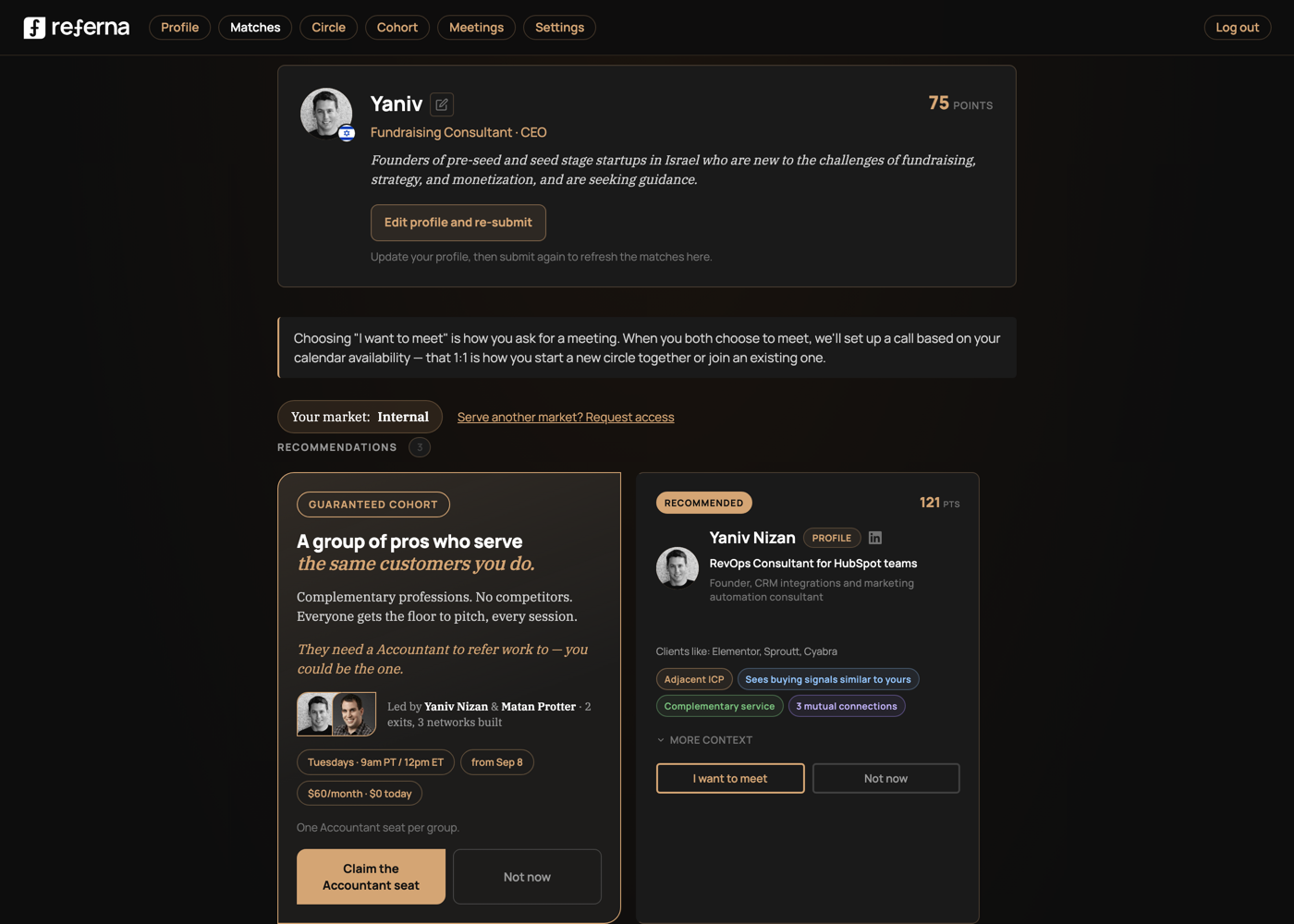
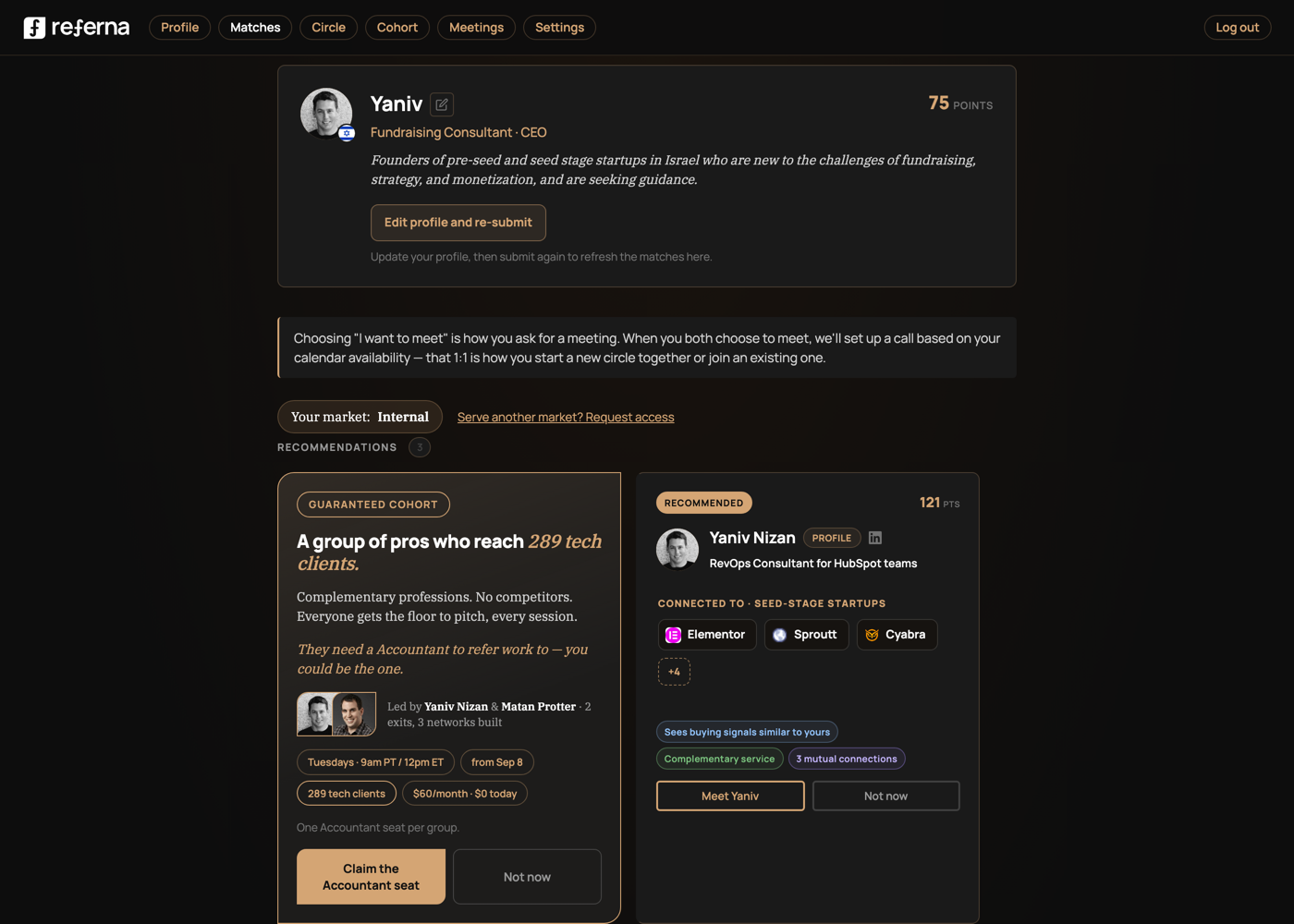
The matches page — the card should show the path to your next client, not a person's bio
Today — real screenshot
Face, profession, timezone; the match reasoning collapsed under "More context." When client data is missing, the code invents a count ("12 of their clients match your ICP," hashed from the person's name).
Proposed — same card, 20% changed
The pills stay; the repeated text goes. One earned claim leads — "Connected to · seed-stage startups" — with real logos, no duplicated counts. CTA becomes "Meet Yaniv." Matching itself should rank by this same number: customers in the viewer's target market.
23
Before / after · Surface 2.1
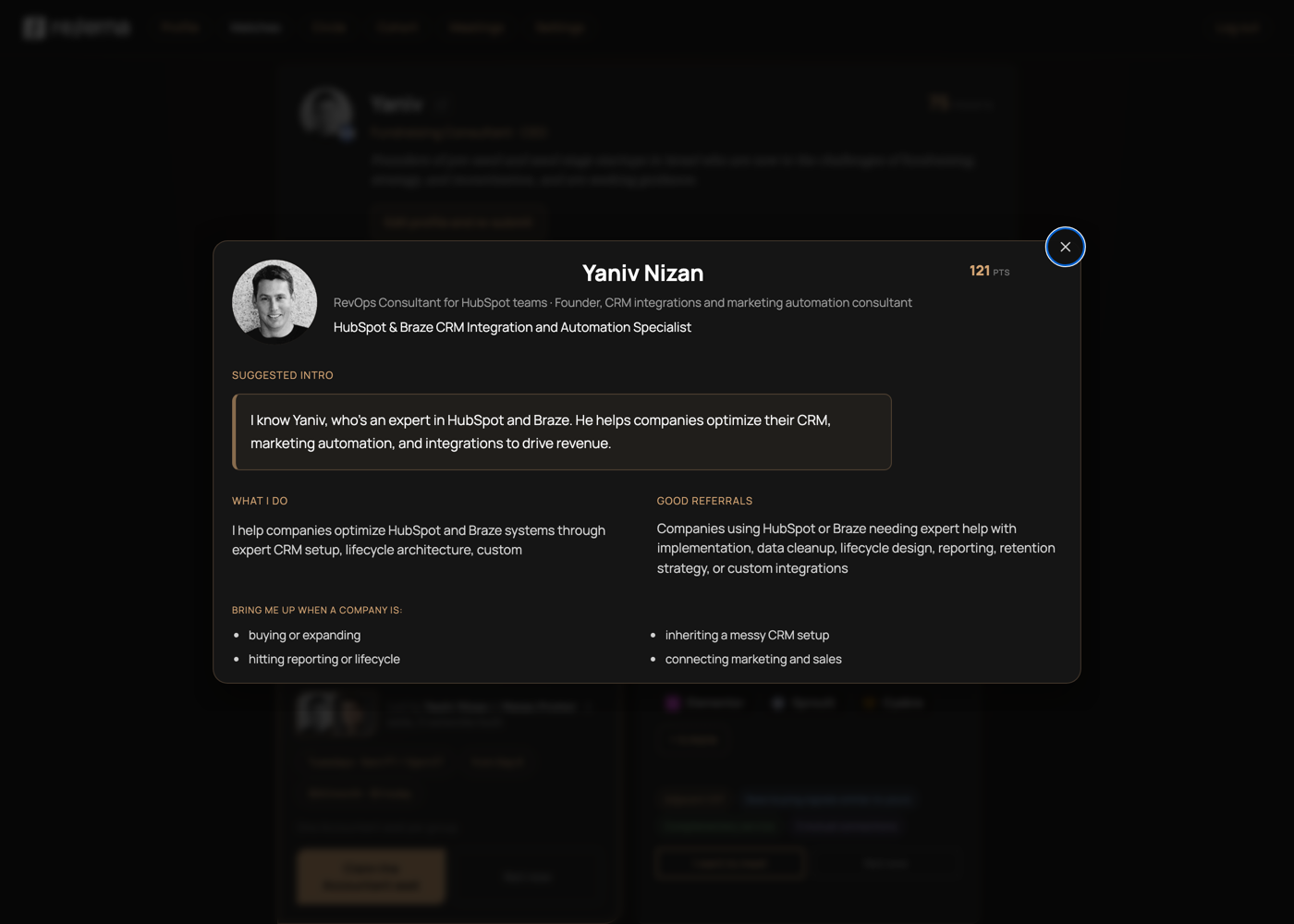
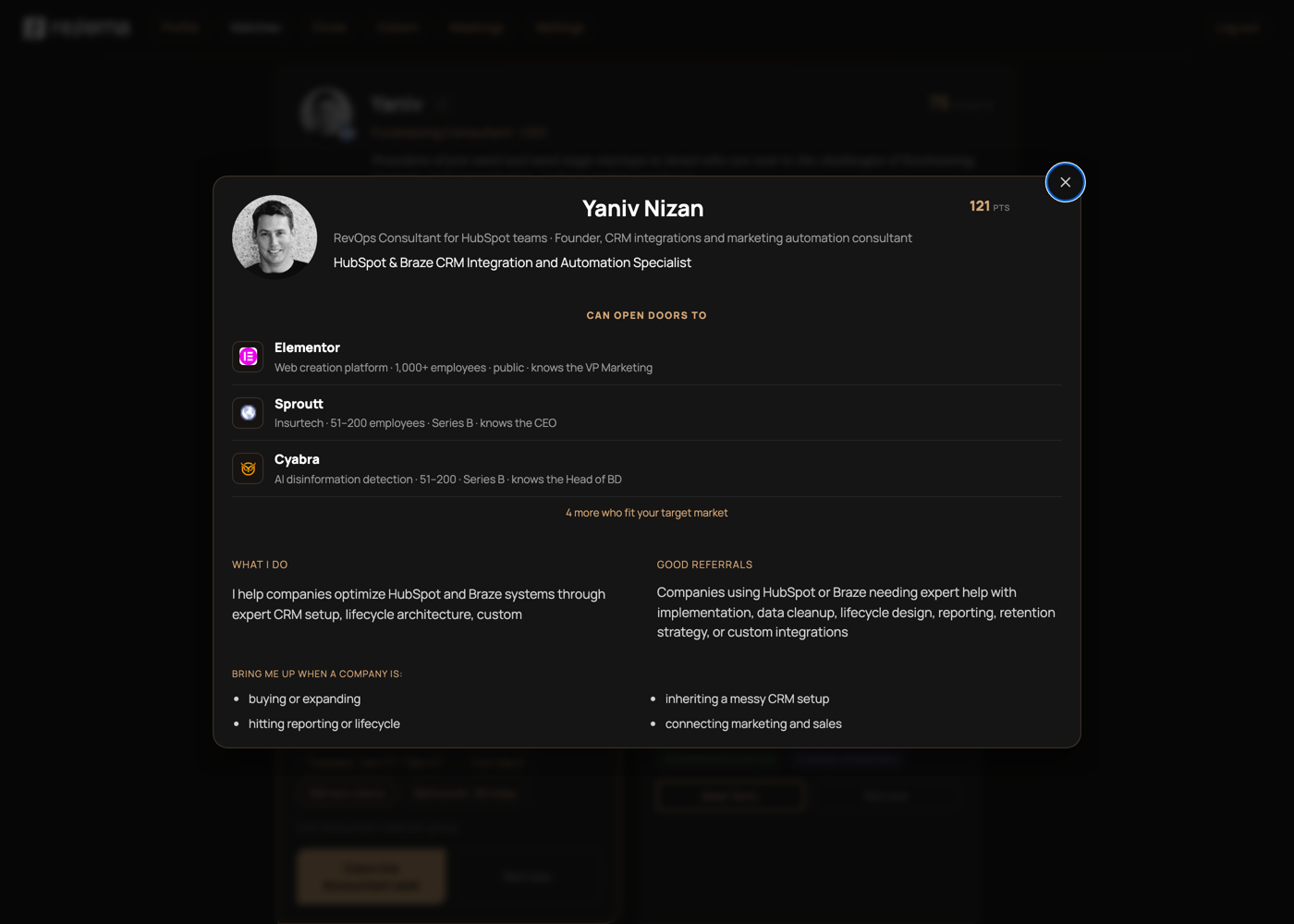
The expanded profile — same fix, one level deeper
Today — real screenshot
Four prose sections about the person — what I do, good referrals, bring me up when. All words, no evidence.
Proposed — same modal, 20% changed
Inside the card, right under the name: per-client rows — logo, company, employee count, funding stage, contact seniority ("knows the CEO"). Suggested-intro prose is gone. "4 more who fit your target market" replaces the vague "revealed after you meet."
24
Before / after · Surface 2.2
The scheduler — booking a call is also the moment to earn it
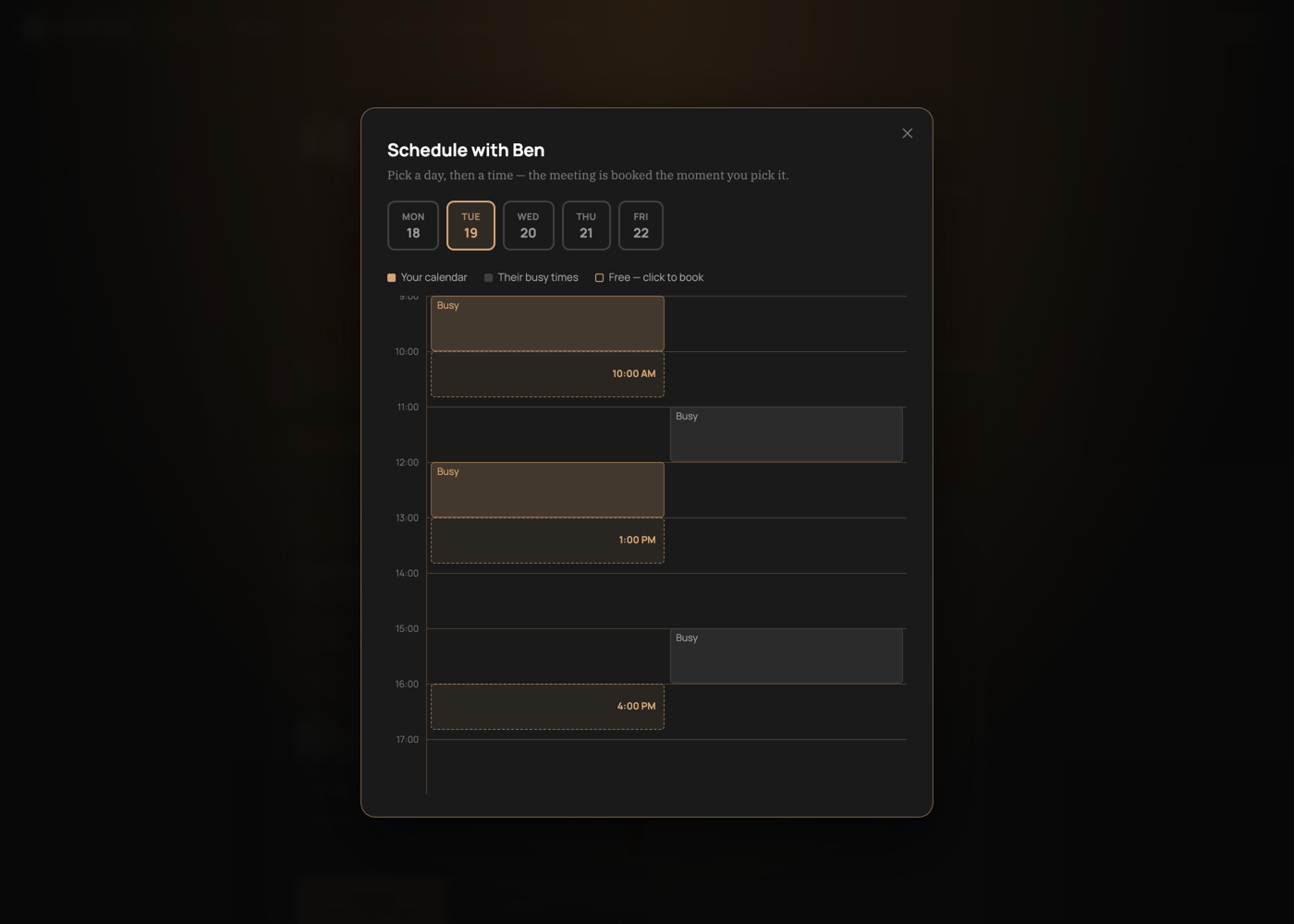
Today — real screenshot
A calendar grid — pick a day, pick a slot. No context on why this meeting is worth either person's time.
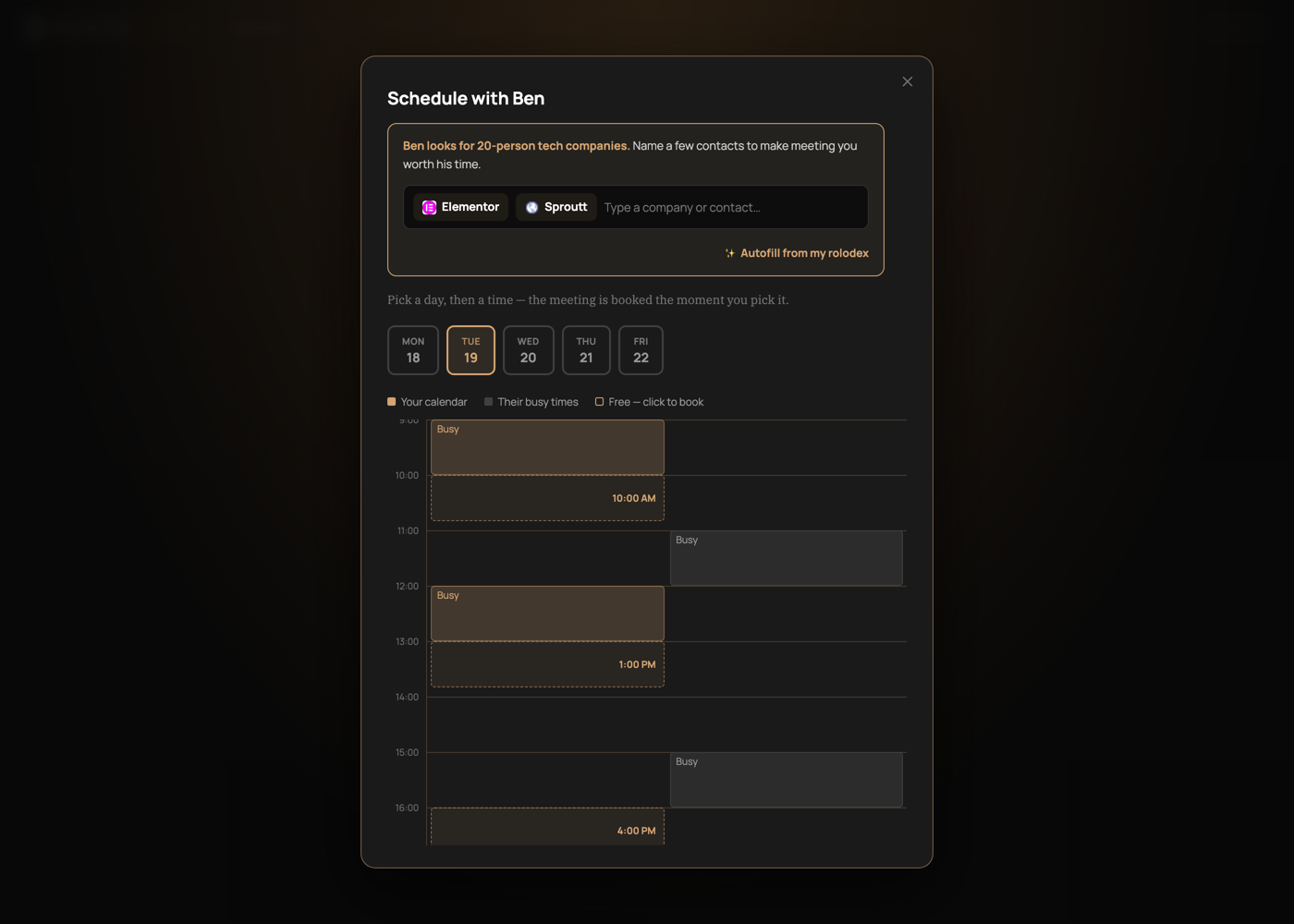
Proposed — same picker, 20% changed
One short, specific prompt: "Ben looks for 20-person tech companies — name a few contacts." An autocomplete field resolves free text to real client chips (logo + name; id and domain stay hidden). "Autofill from my rolodex" pulls from the client list you already built.
25
Before / after · Surface 3
Emails — fifteen recurring templates, zero client-led subject lines
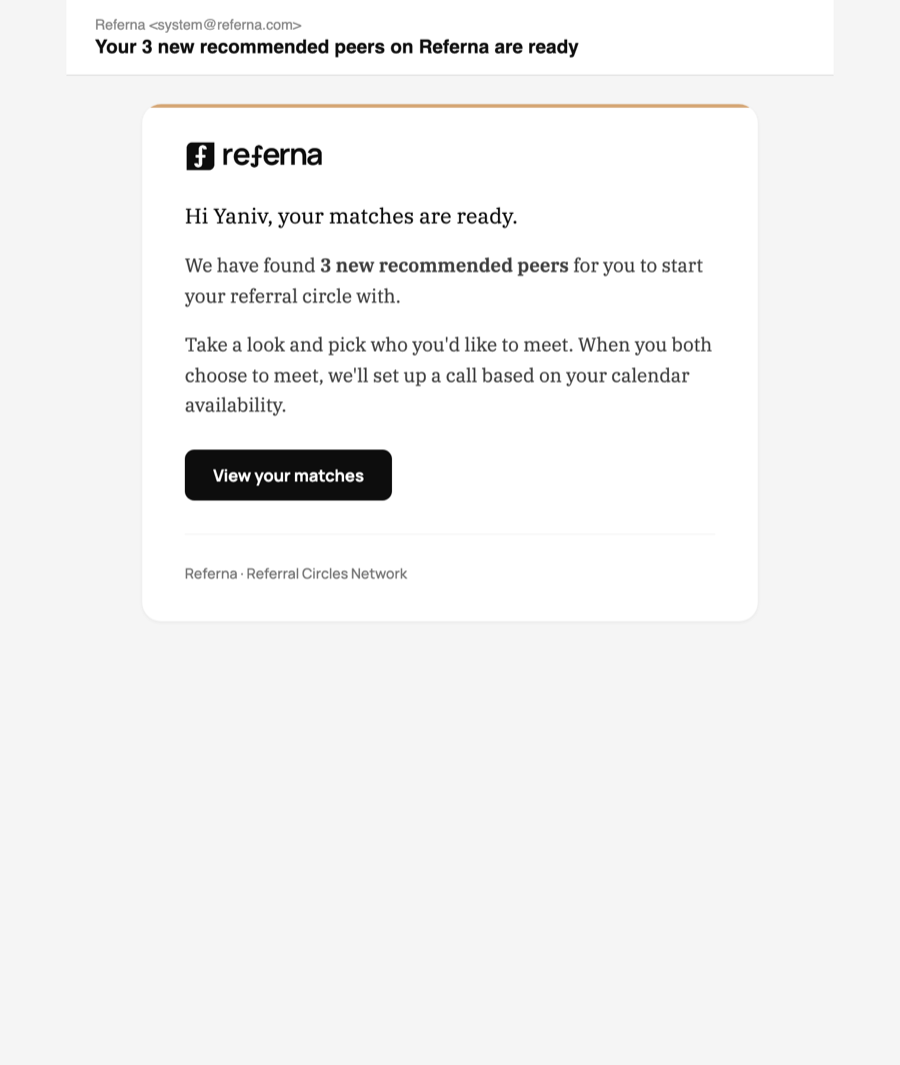
Today — real template, real subject
"Your 3 new recommended peers on Referna are ready." Across the entire recurring set, no subject or opening line ever names a client. The highest-frequency surface sells membership upkeep.
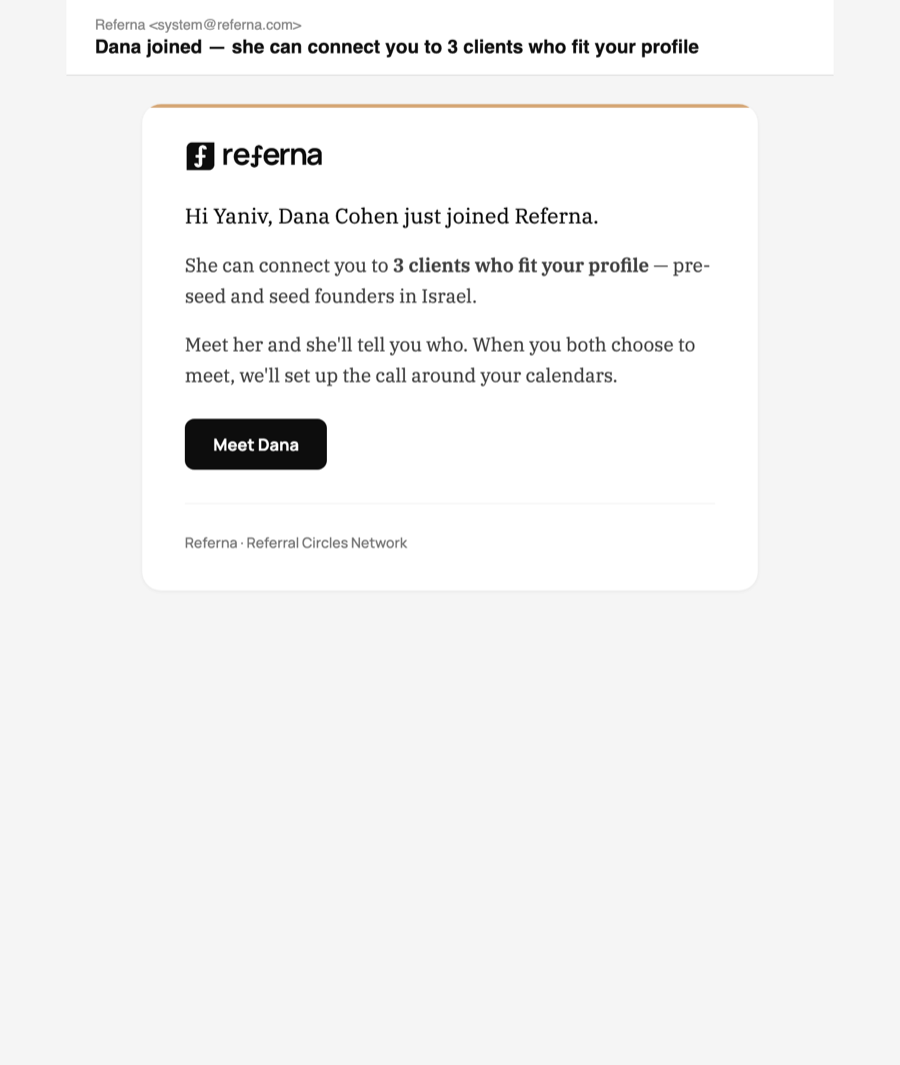
Proposed — same template, 20% changed
The curiosity hook does the work: "Dana joined — she can connect you to 3 clients who fit your profile." A count, not names — stronger pull, zero data exposure. CTA: "Meet Dana."
26
Before / after · Surface 4
The live meeting — the most spine-aligned surface we have. Keep it. Bank its output.
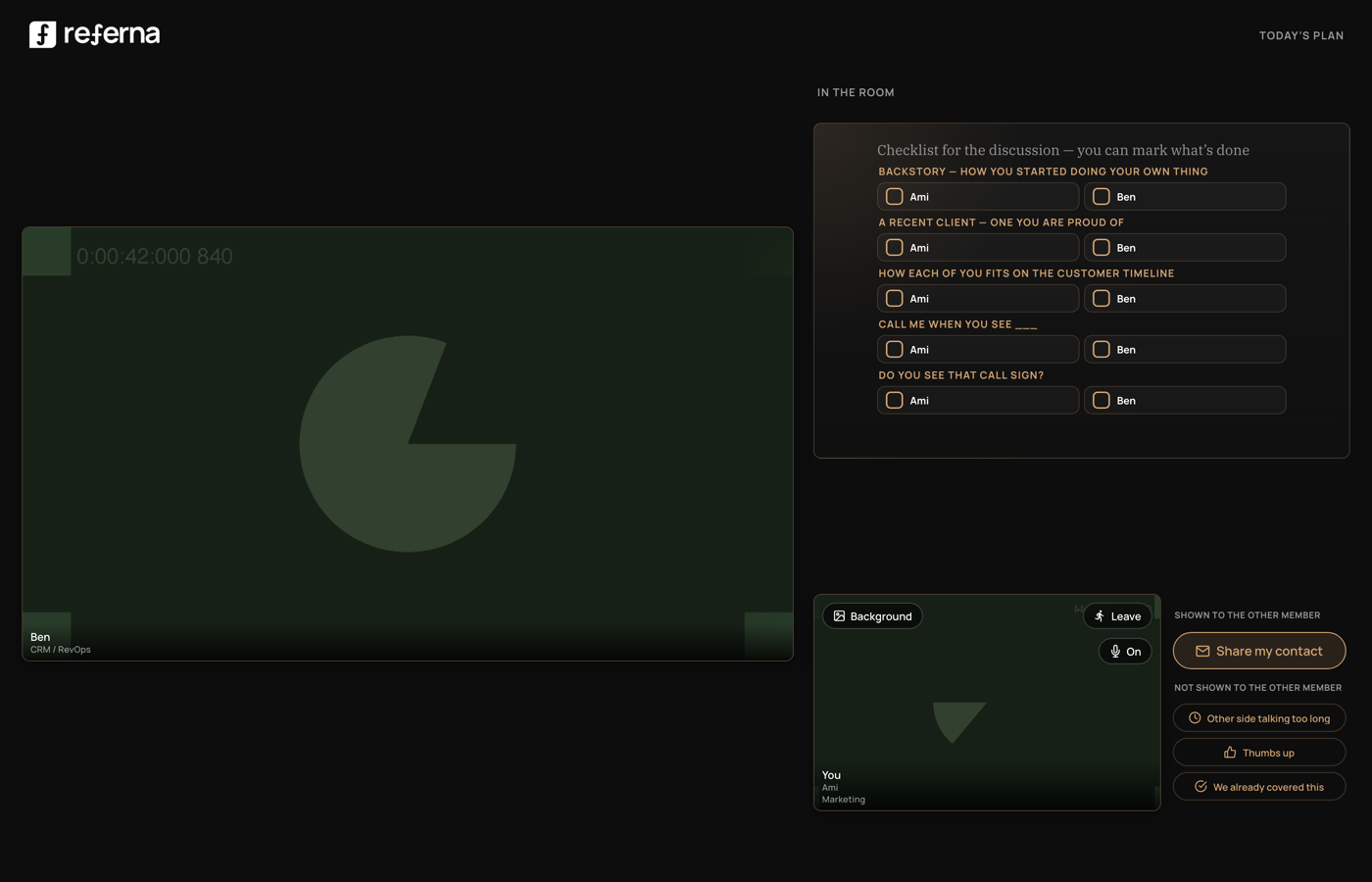
Today — real meeting room
The real two-person room: counterpart video, the five referral rounds. Gordy already runs the call at the client — but everything said here evaporates when the room closes.
Proposed — same room, 20% changed
The counterpart video is top-aligned with the checklist while the self feed stays below it; both remain the real room at its real size. The panel sits directly beneath the counterpart feed. Two boxes, "You mentioned · 2" and "Ben mentioned · 1," real logo chips, light border matching every other card on the page.
27
Implemented · Surface 4.1
The weekly cohort session now turns the room into a live referral engine
Implemented in integration-2 — real live-meeting-agent screen
One member takes the stage while the room maps real companies against that member's client brief. Here, Adobe has already moved into Nina's client bucket — the referral round is now a working interaction, not another item on the agenda.
28
Before / after · Surface 5
The recap email — clients are mentioned, then buried in prose
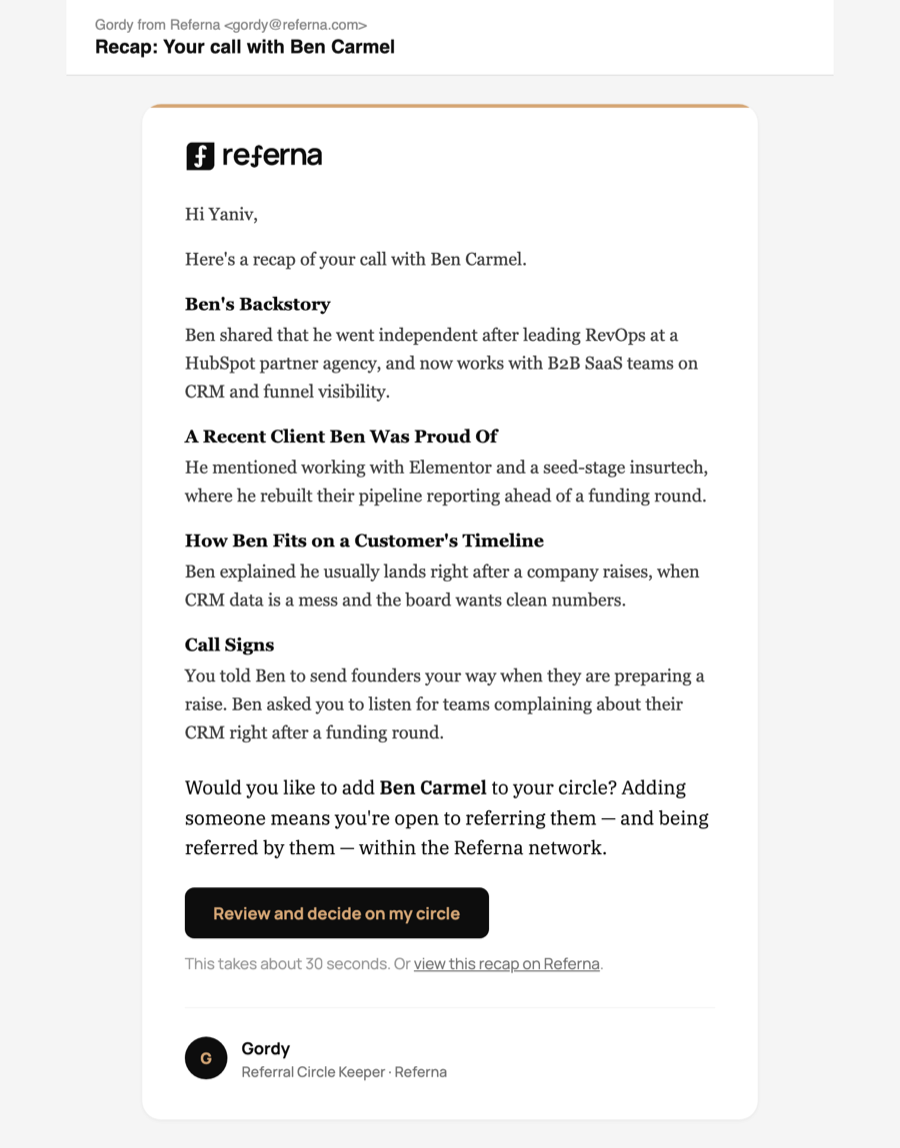
Today — the real recap email
The recap already contains clients — "He mentioned working with Elementor and a seed-stage insurtech" — as sentences in a story. Nothing is extracted, counted, or followed up.
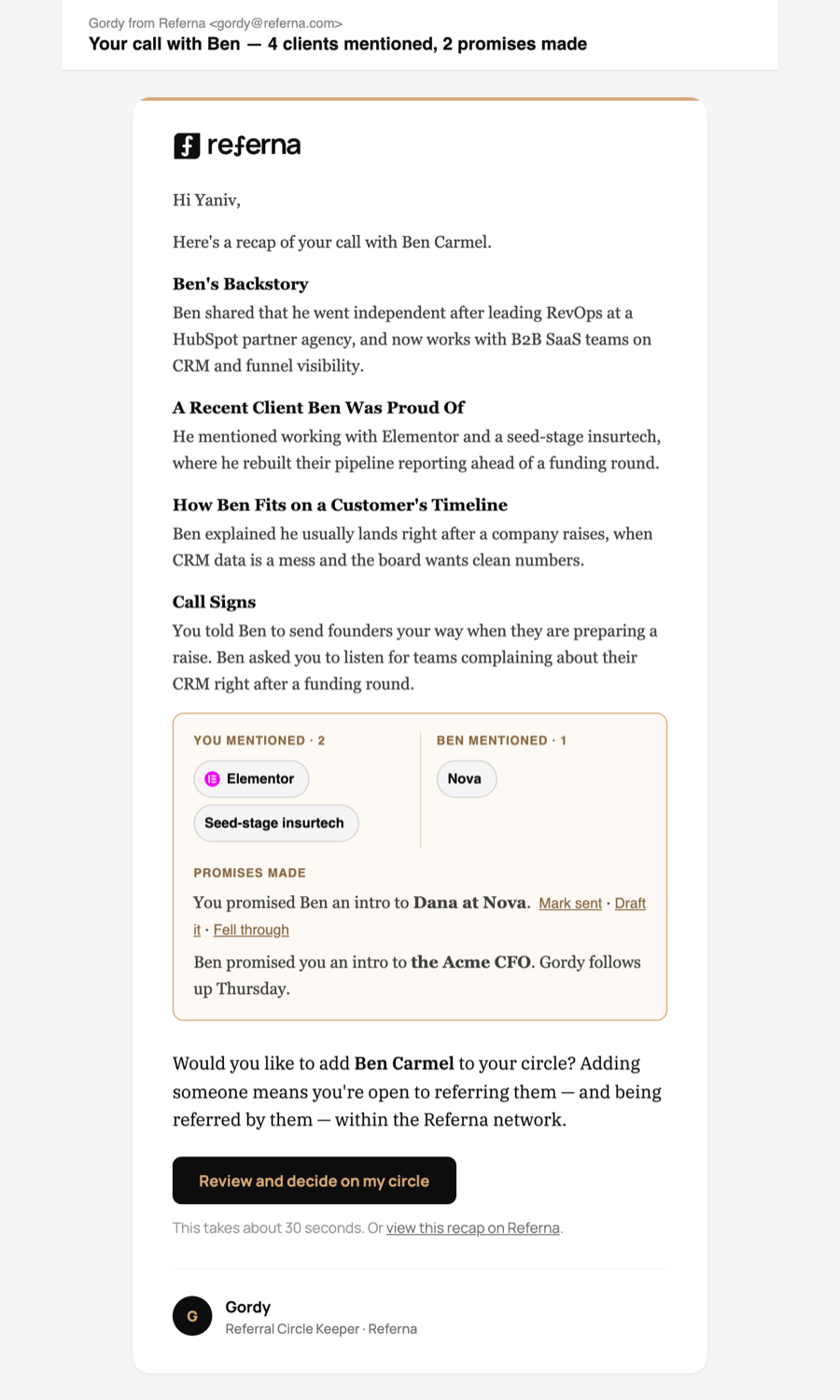
Proposed — same recap, 20% changed
Split by who said it — "You mentioned · 2" and "Ben mentioned · 1" — each as logo chips. Promises get one-tap follow-through, extracted from the full transcript after the call, where detection is reliable.
29
Before / after · Surface 6
The meetings page — recaps that hide the clients they contain
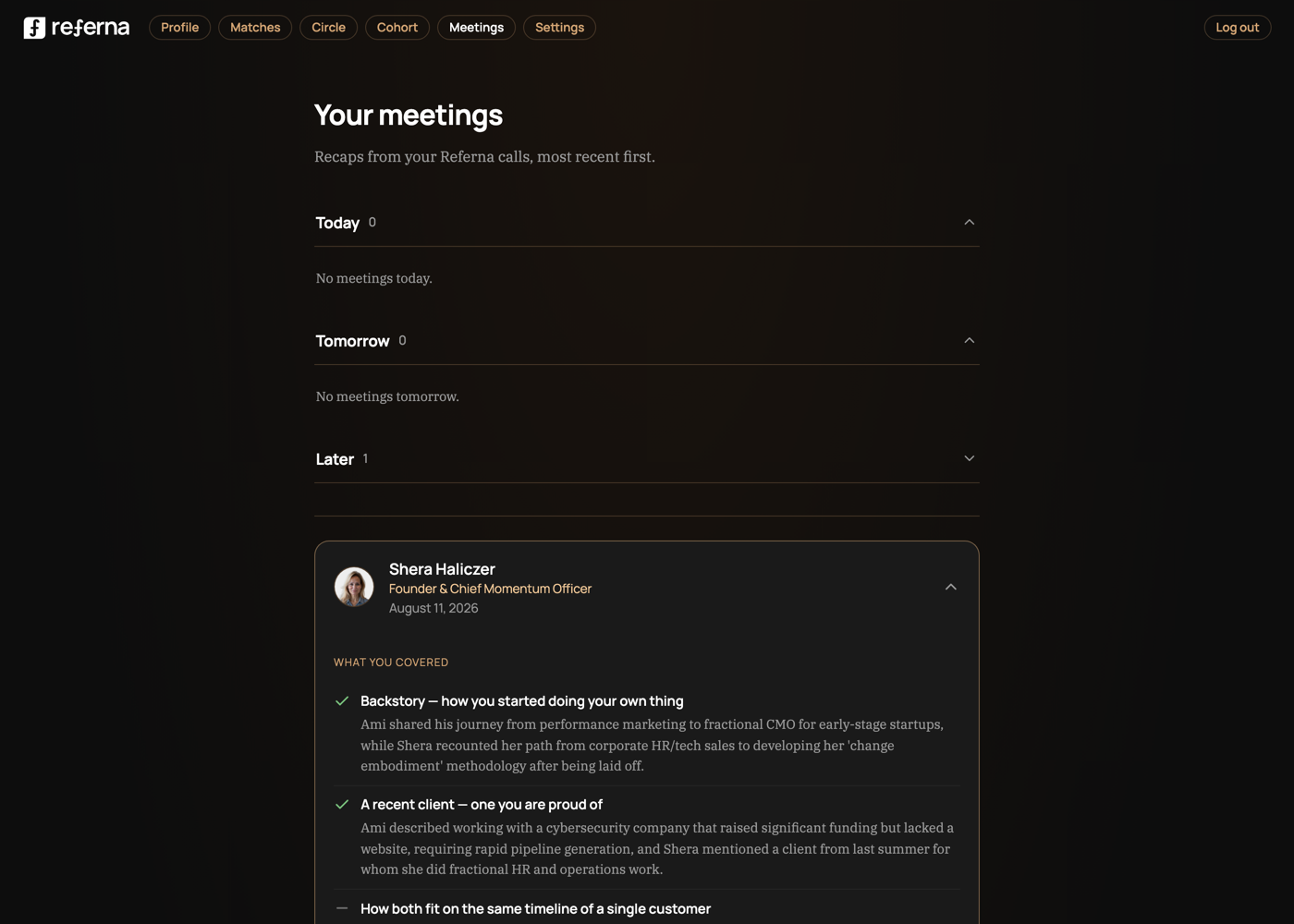
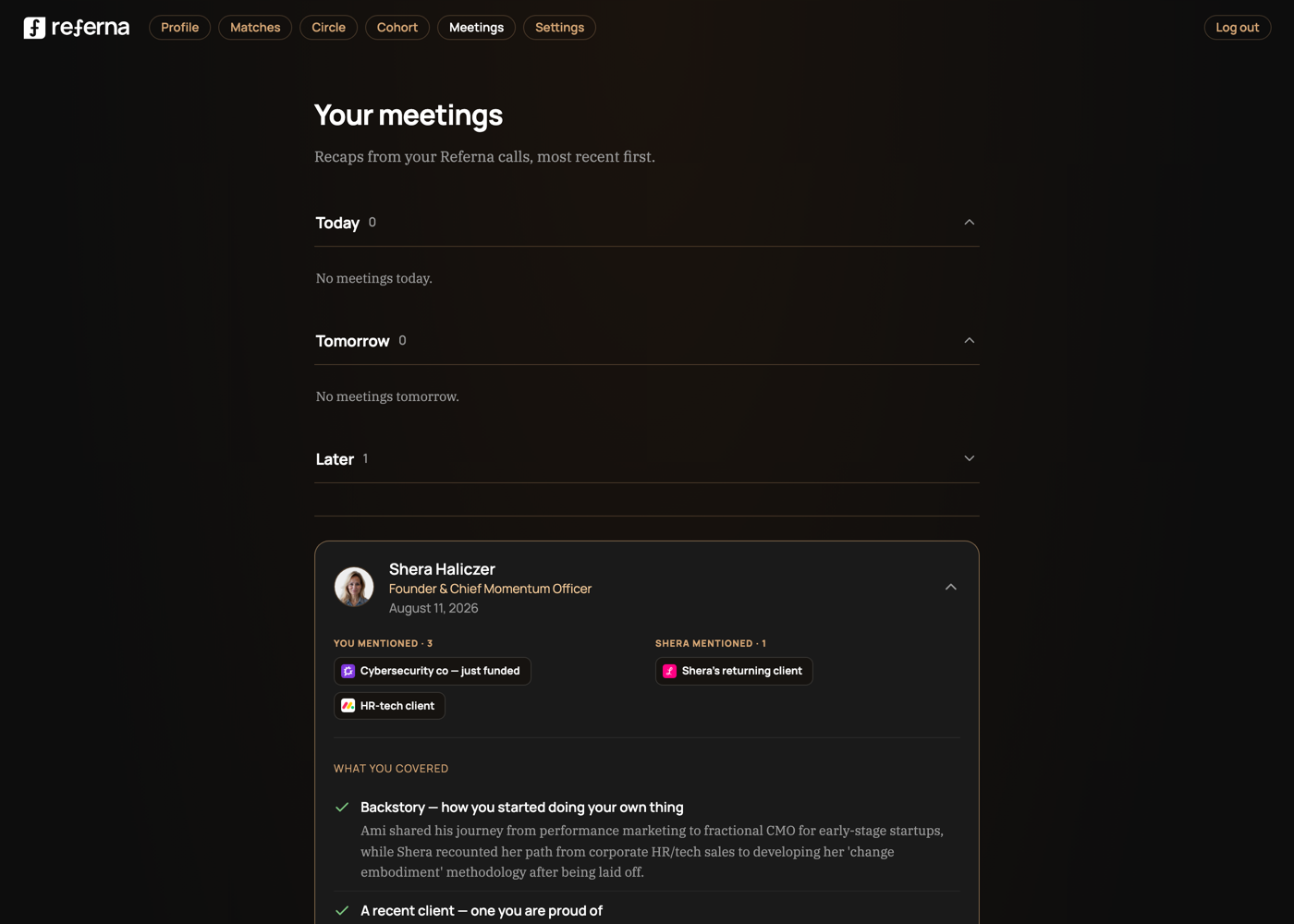
Today — real screenshot
Recaps with per-topic checkmarks. The clients discussed are in the prose — never extracted, never visible at a glance.
Proposed — same page, 20% changed
Same split as the recap email — "You mentioned" and "[Name] mentioned" side by side, same chip style used everywhere else in the deck. The meetings page becomes a ledger of client discovery, not attendance.
30
Before / after · Surface 7
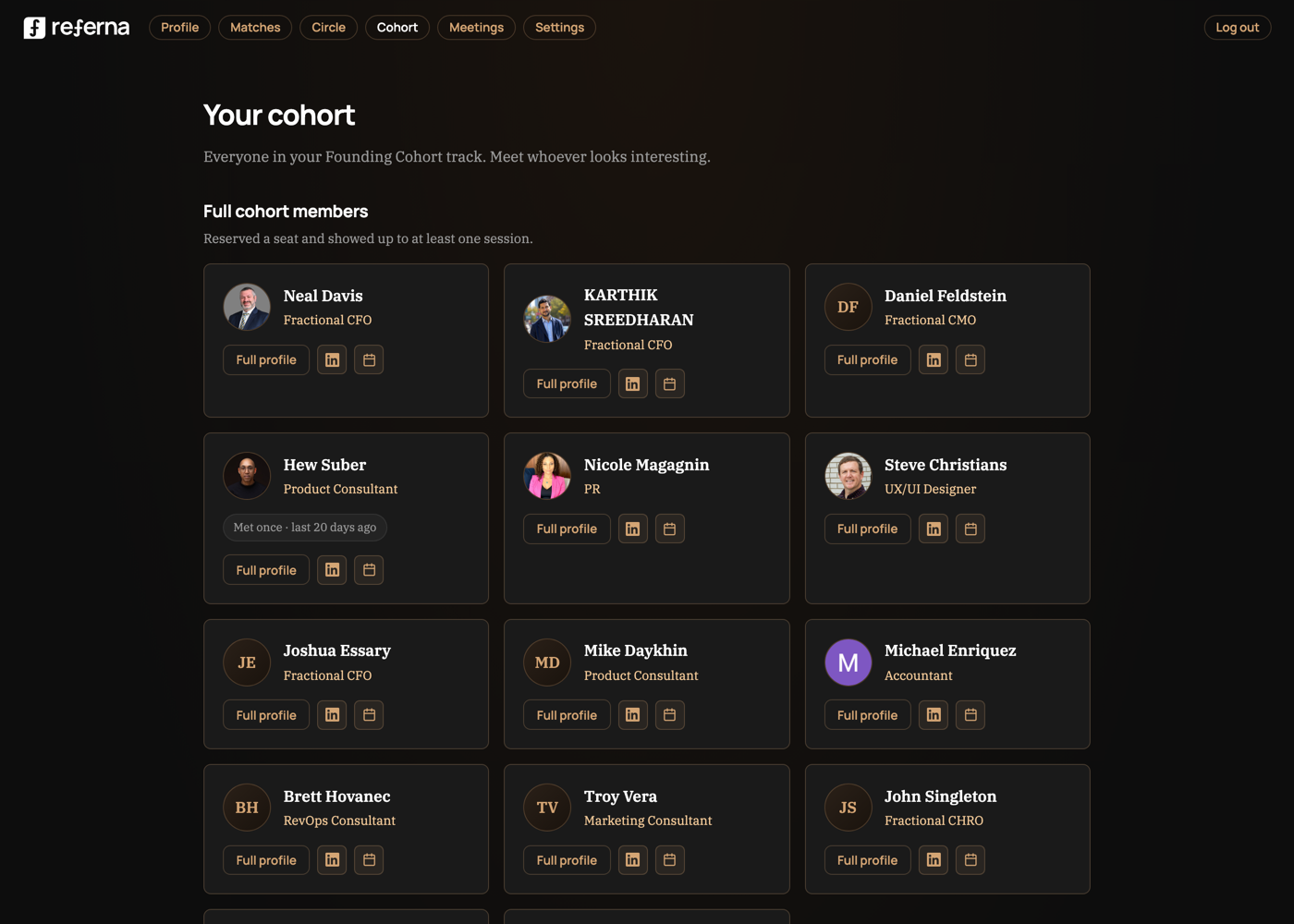
The cohort roster — an attendance sheet that should be a referral market
Today — real screenshot
"Meet whoever looks interesting." Cards show photo, profession, and how often you've met — no reach signal anywhere, no summary of what the room is worth.
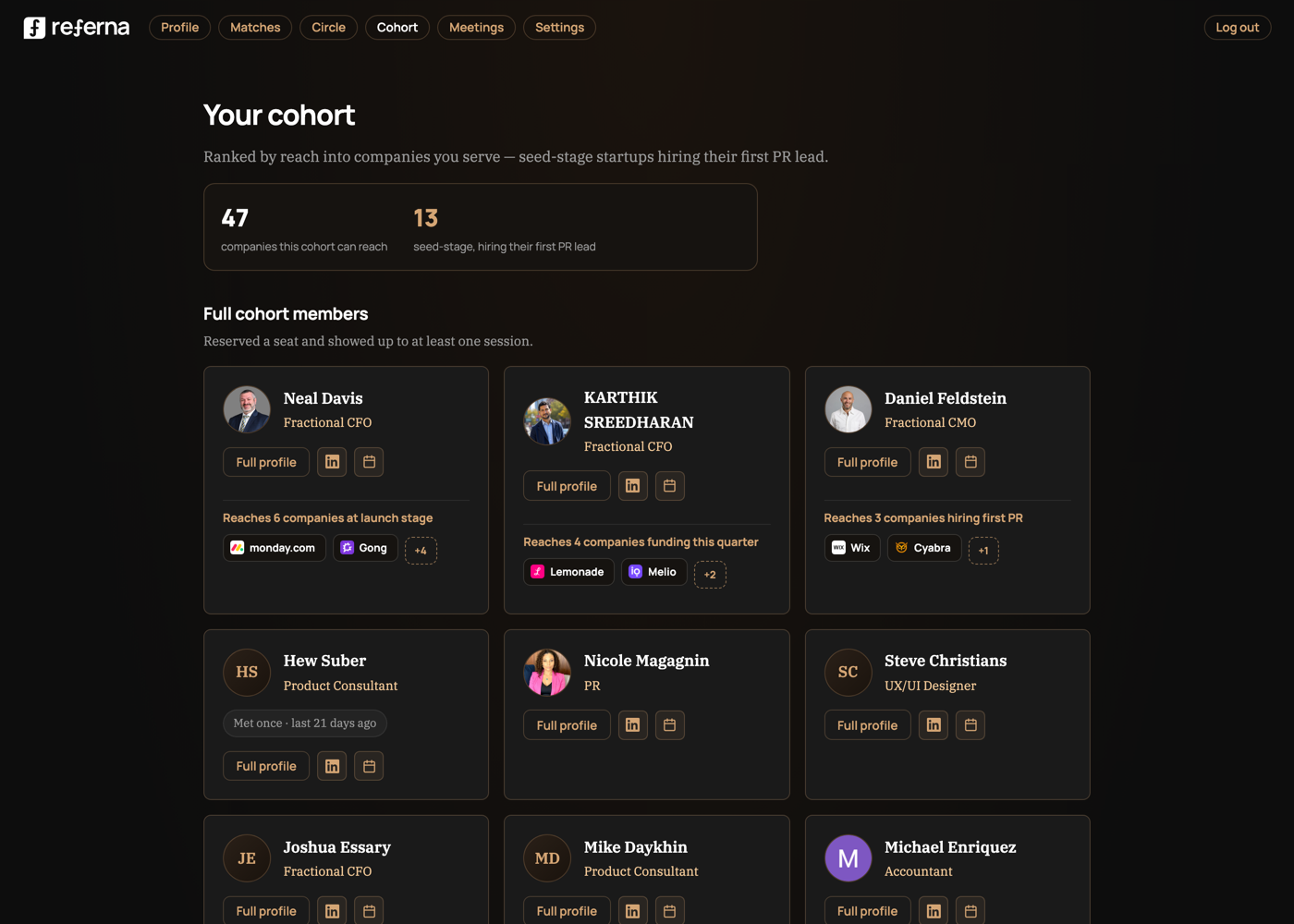
Proposed — same roster, 20% changed
A summary bar leads the page — "47 companies this cohort can reach · 13 seed-stage, hiring their first PR lead" (the viewer's actual criteria, not a placeholder). Every card carries real logos and the same framing: "Reaches N companies at <their stage or trigger>."
31
New · Surface 7.1
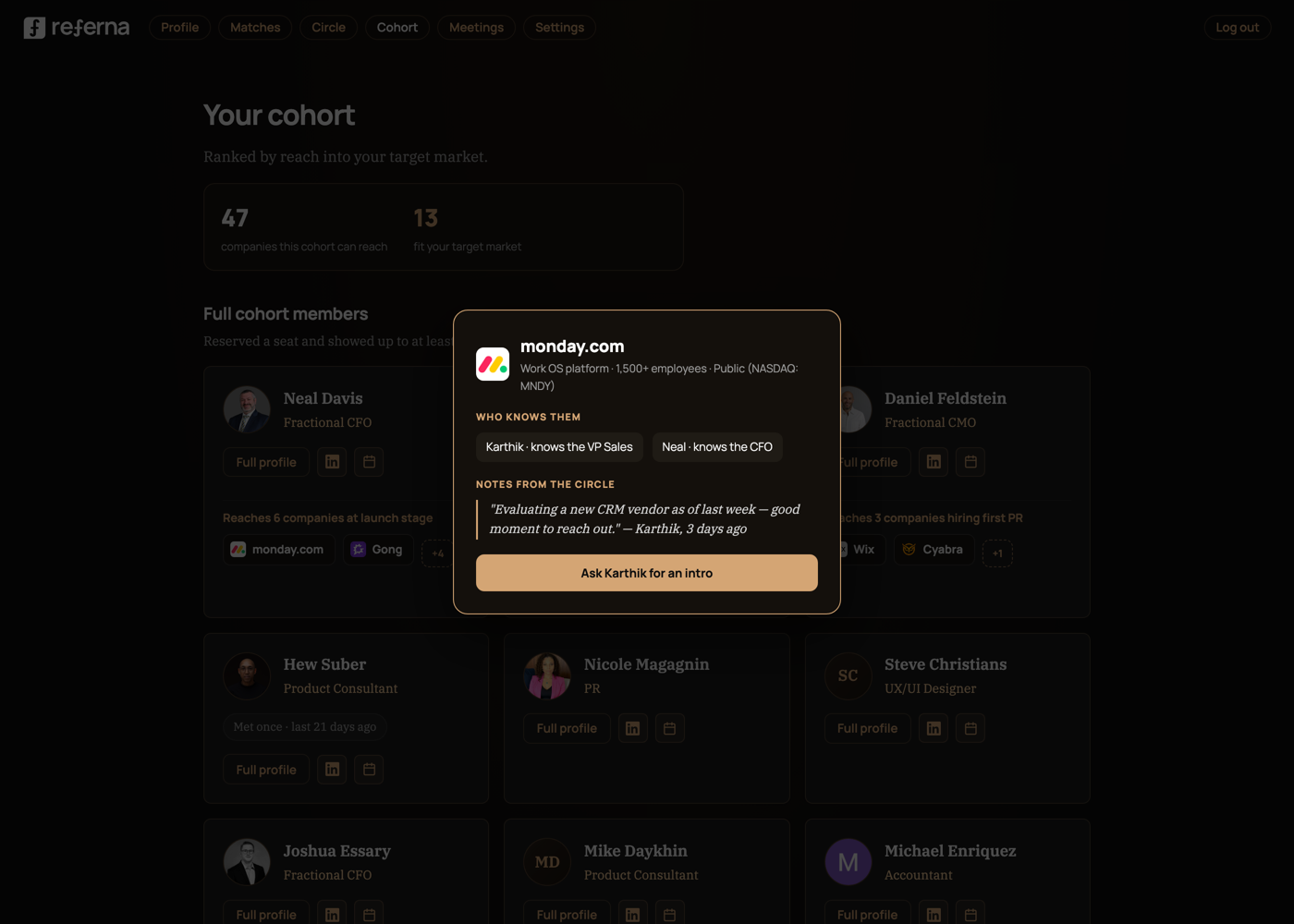
Click a logo — the company becomes a shared record
Proposed — new capability
Clicking any logo opens a collaborative CRM entry for that company: size, ownership, who in the circle knows them and in what role, and freeform notes members leave for each other — "Evaluating a new CRM vendor as of last week." One tap asks the connector for an intro.
32
Before / after · Surface 8
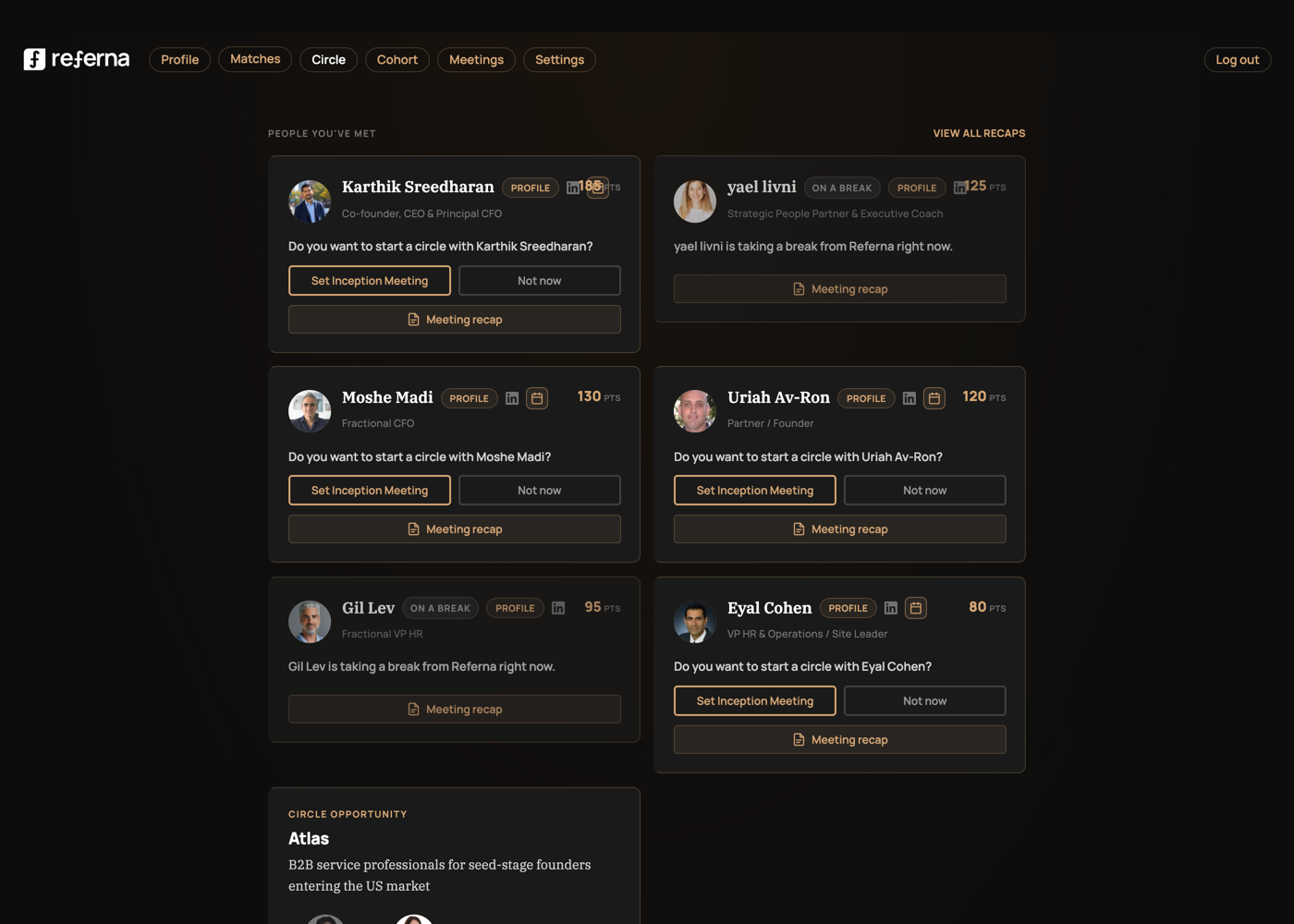
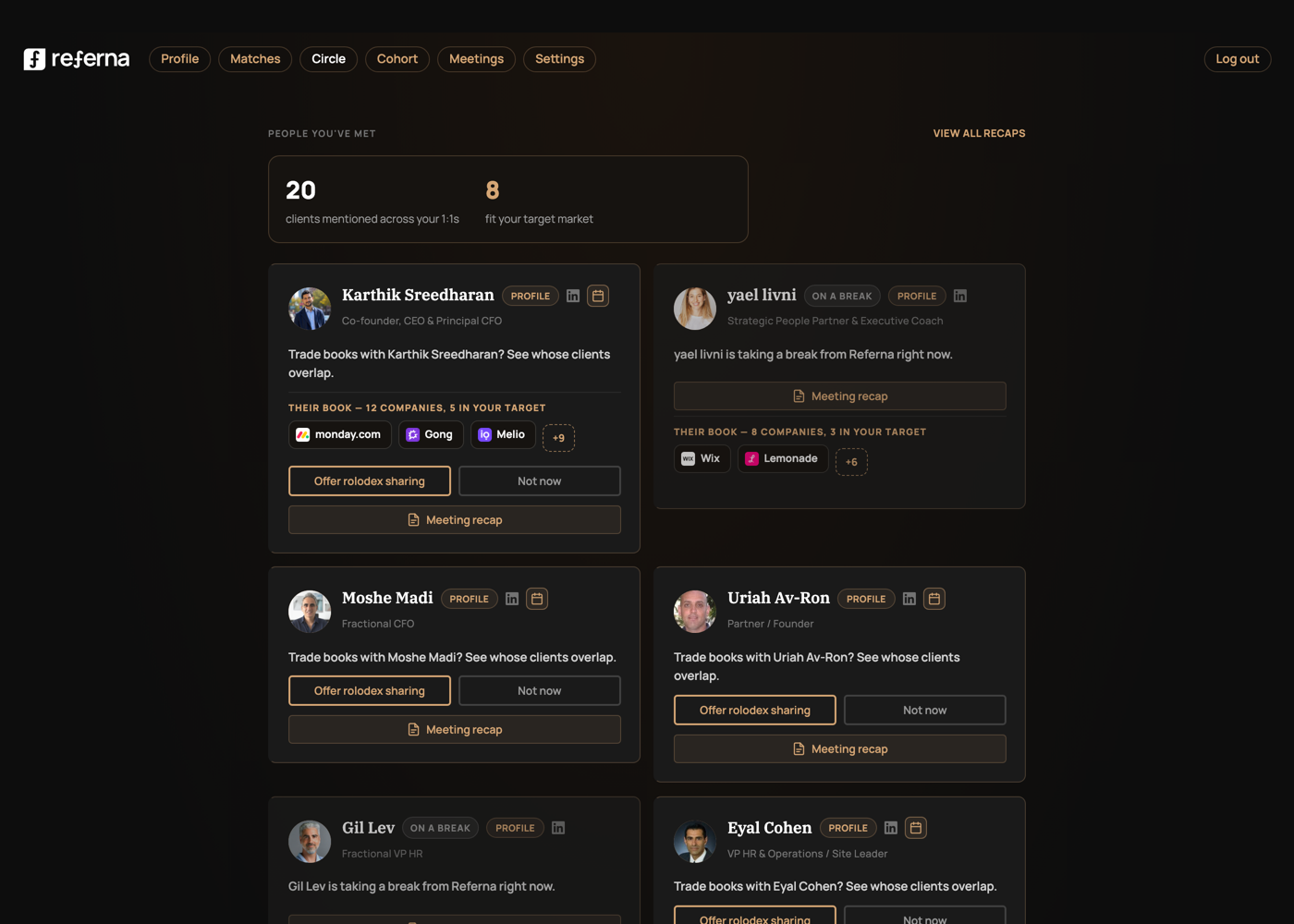
The circle page, pre-circle — where most members actually are
Today — real screenshot (member with no circle)
"People You've Met" cards push one ask — "Set Inception Meeting" — a governance step, before any value has been shown.
Proposed — same page, 20% changed
A summary bar leads: "20 clients mentioned across your 1:1s · 8 fit your target" — this is what your calls have already surfaced, not a made-up pipeline. Each met person shows their client list; the main action becomes "Offer rolodex sharing."
33
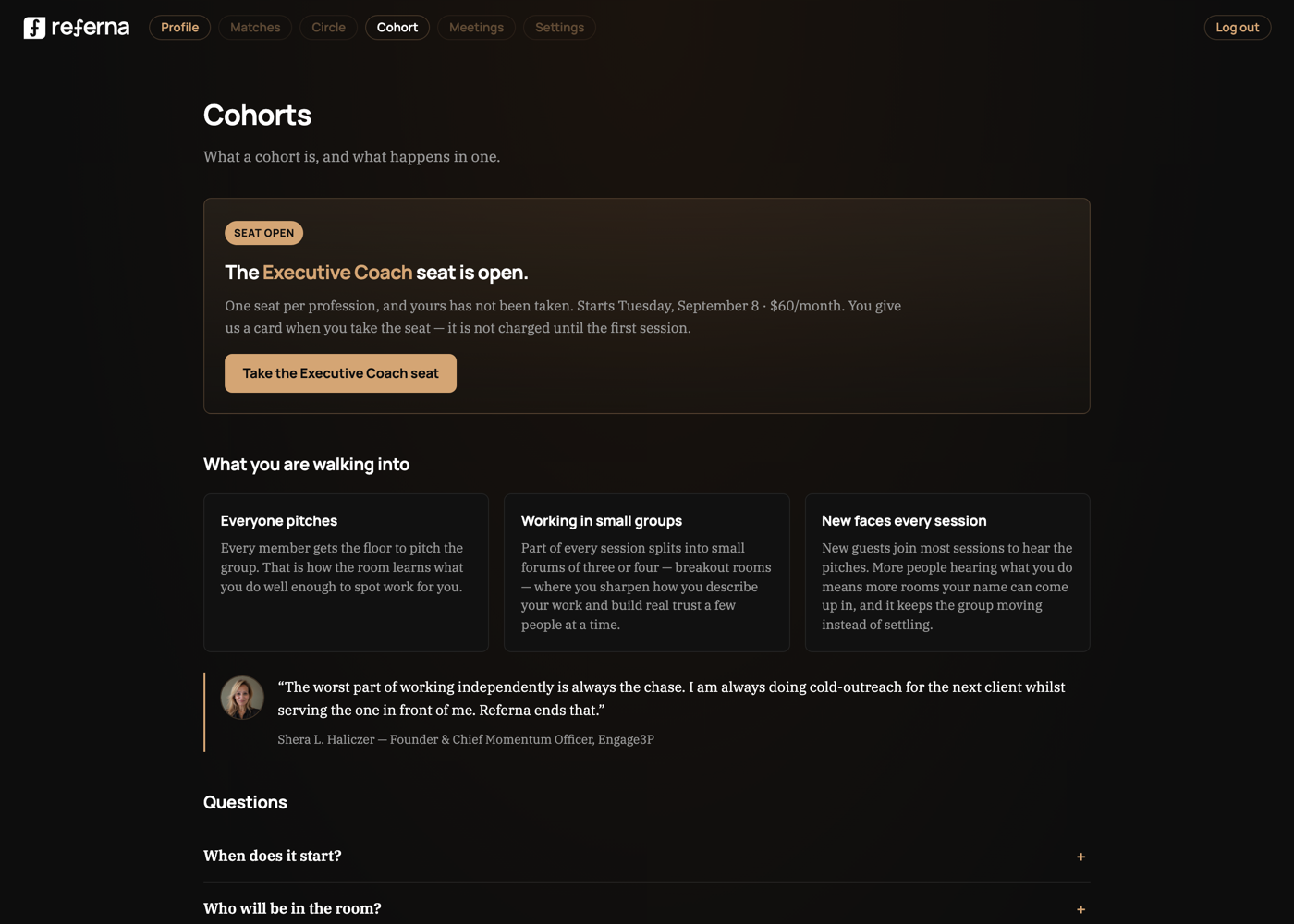
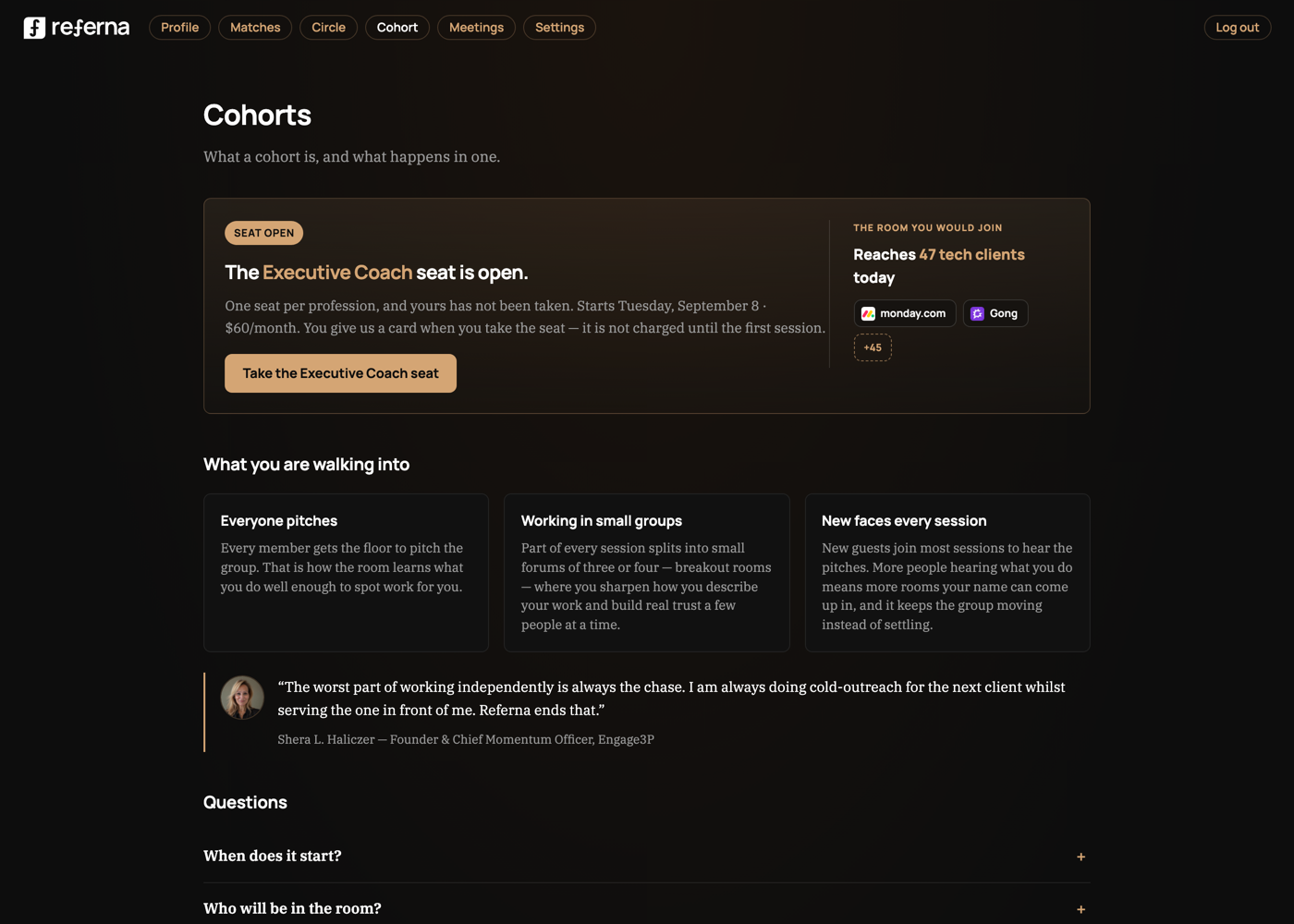
New · Surface 9
The cohort page, before you're even in one
Today — real screenshot (member with an open seat)
"The Executive Coach seat is open." One column, one claim: headcount and price. Nothing about who is in the room.
Proposed — same panel, 20% changed
Two columns inside the same bordered panel — no box inside a box. Left: the existing offer. Right: "Reaches 47 tech clients today" with real logos, so the room's value shows before you take the seat.
34
New · Surface 10
The cohort seat promo — "20 peers" is weaker than what they can reach
Today — real screenshot
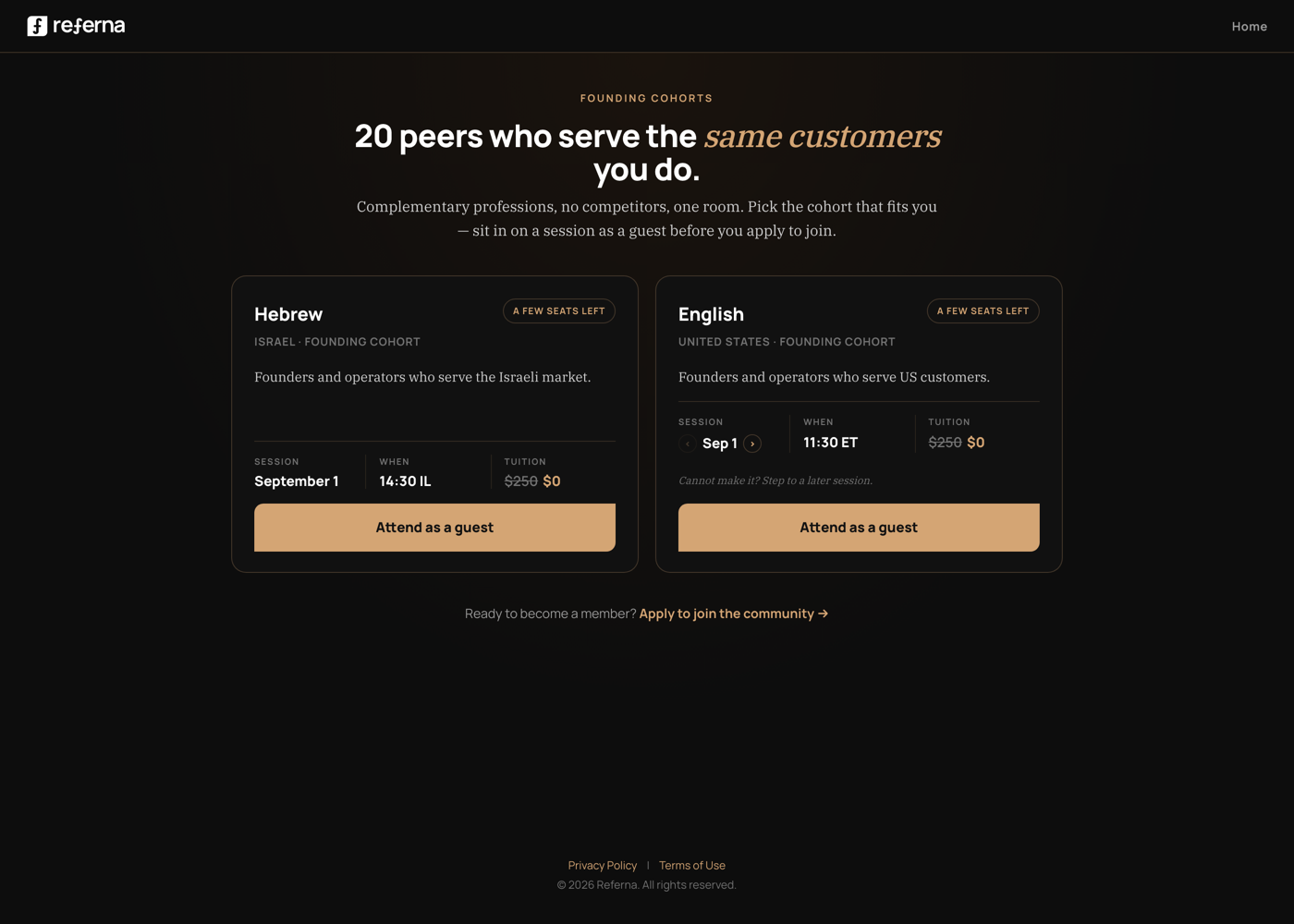
"20 peers who serve the same customers you do." A headcount claim — how many people, not which clients.
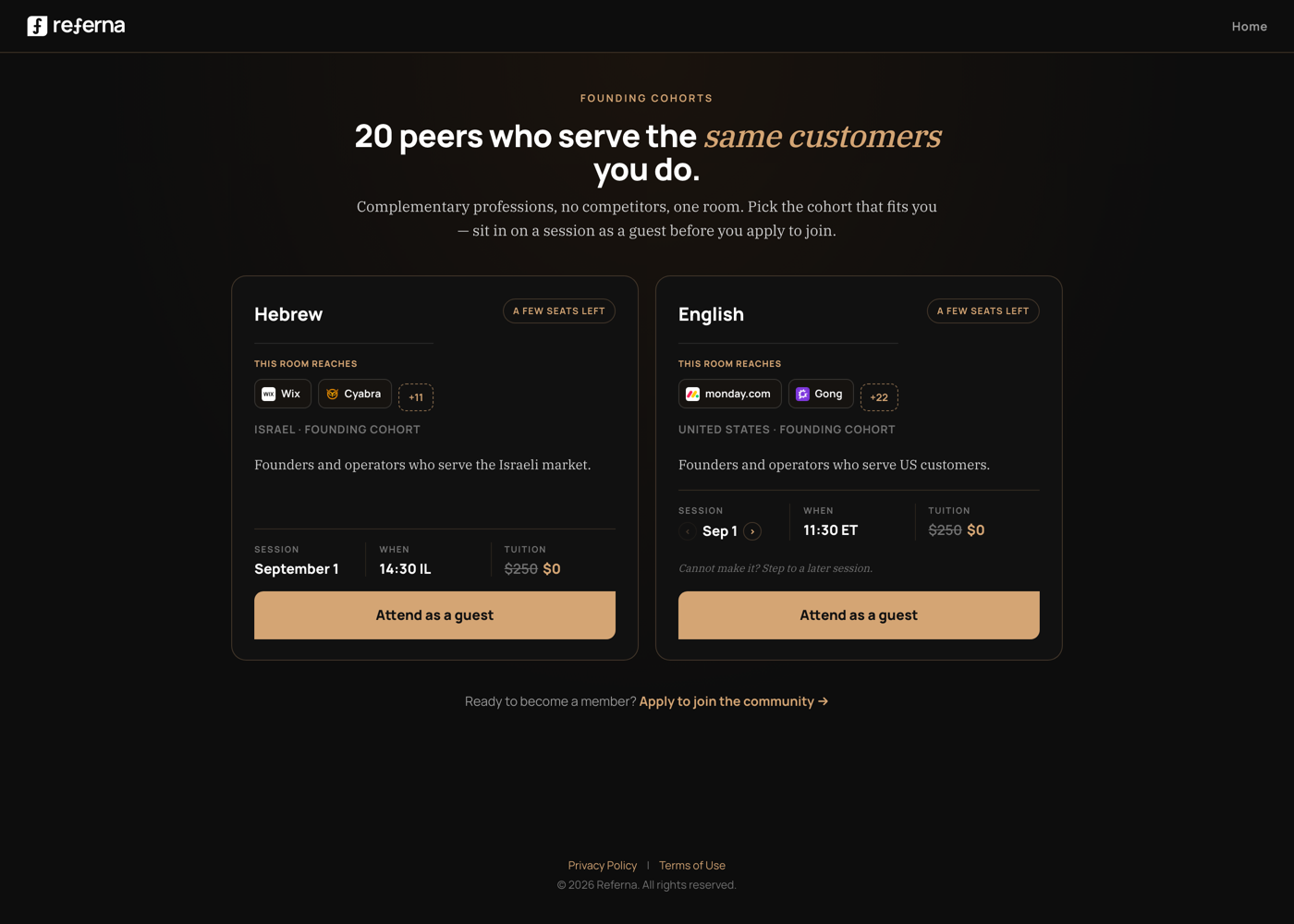
Proposed — same page, 20% changed
Each cohort card carries its own logos — not a shared block above both. Hebrew reaches Wix and Cyabra; English reaches monday.com and Gong. Each room is sold on the clients actually in it, not a generic claim applied to both.
35
Measuring the spine
Referral is the opposite of pipeline. Count reach, not follow-ups.
Pipeline is managing people who came to you at the wrong time. Referral is having people who know exactly when to send you someone ready to buy.
D
Clients discovered per member
The client list: relationships mapped from calendars, contacts, onboarding, every call. Today this data exists and is thrown away.
M
Clients mentioned per call
Every 1:1, group session, and mixer already surfaces clients in conversation. Count them, show them, keep them.
R
Reach: who can mention your name
How many people remember you, in front of how many customers in your target market — the number every circle, roster, and profile should lead with.
C
Referred clients landed
The goose itself — reported through the thank-you flow that already exists. No stages, no follow-up hygiene, no pipeline.